clean bookface

Social networking. Before the advertising department moved in.

GitHub
Independent. Open source. Not affiliated with Facebook or Meta.The small print
A fictional summer afternoon by a lake, with bicycles and a picnic tableMore of this. Less scrolling.

Clean Bookface

Your friends. Your memories. Your rules.

v0.1 public preview
Clean BookfacePinned project note · You choose what comes next

Remember when your feed was your friends?

A few photos. An ordinary Tuesday. Someone asking who’s around on Saturday. We liked that bit.

Clean Bookface gives your Facebook download a home you control. Keep your history private, share a memory with a friend, and read their posts in order.

No ads. No engagement ranking. No bot accounts.
Just the useful part of a social network, with an exit door.

Help me get startedGet it on GitHub

A small but important detail: this is the project’s front door. Your circle has its own address and sign-in. Never enter your Facebook password here.

Bring your memories

Private until you choose to share

You don’t need to understand the files. And you don’t have to delete Facebook.

  1. Get a place to keep them

    A circle is a site run by you or someone you trust. Ask a friend for an invitation. Nobody hosts one yet? Set up a small circle together. If you already have an invitation, open the personal link your friend sent and follow its sign-up steps. Save your recovery codes. You do not need a GitHub account to join.

  2. Ask Facebook for your download

    In Facebook’s settings, find Accounts Center → Your information and permissions → Export or download your information. Choose JSON, save every part, and keep an original backup. Menu names can vary.

    Facebook’s download instructions
  3. Open “Bring your history” in your circle

    Upload the download, then check your photos, stories and import report. Your archive starts visible only to you through the app. Your host administrator can read stored data.

  4. Share one thing with one friend

    Accept each other as friends. Pick a photo or post, review the copy, and choose who sees it. Importing a friend list never contacts anyone.

Taking a break from Facebook—or asking it to delete your account—is a separate, optional step. Check your saved copies first. Read the leaving guide.

This is what you’re getting

The working app

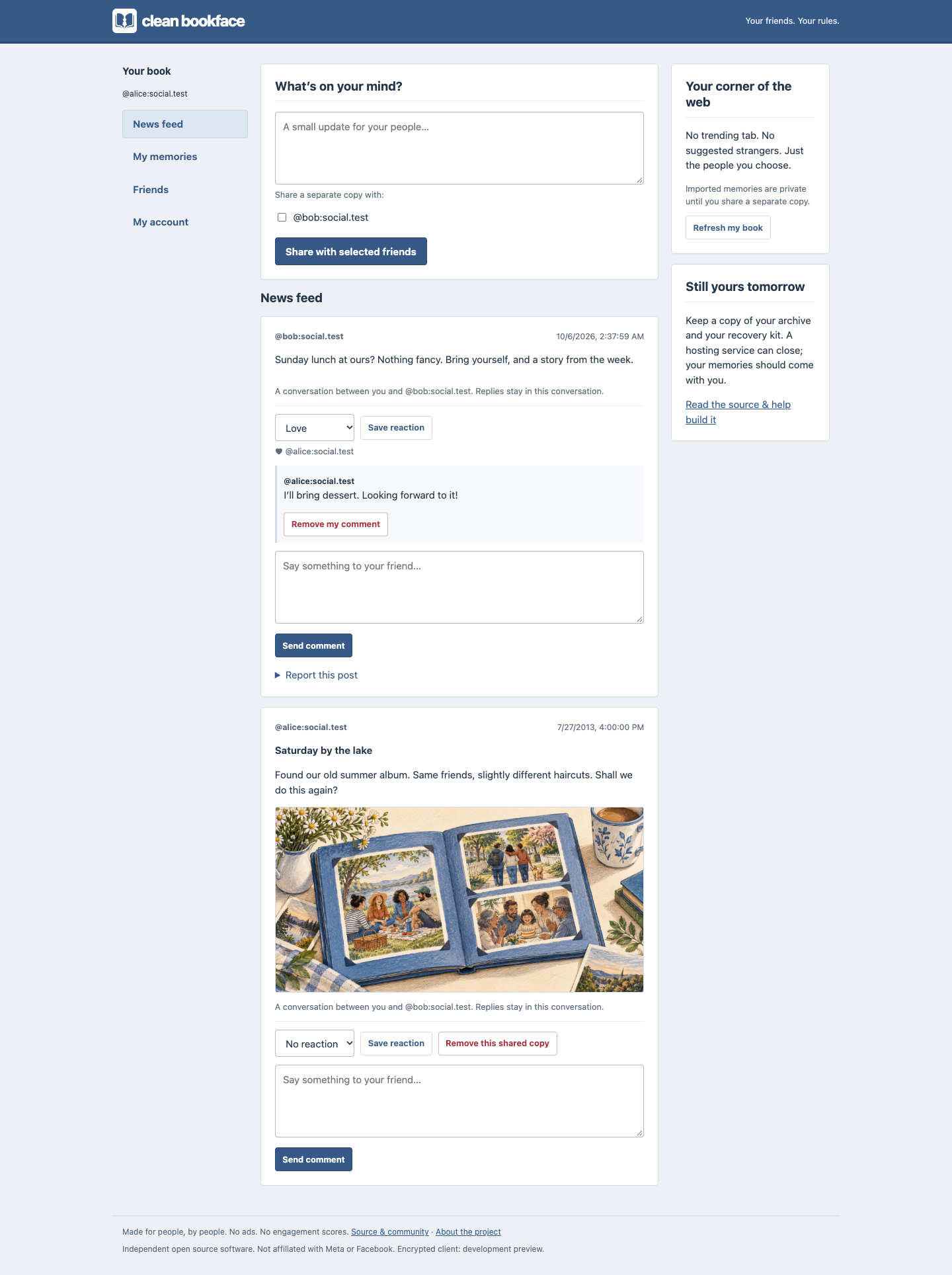
A familiar feed, private albums, comments, and an actual end to the page.

Working Clean Bookface app: blue navigation, a chronological feed, and private memories in the sidebar

Actual app screenshot. All people and posts are fictional.

See it on a phone The working app on a phone, with a compact feed and navigation

A circle of your own

Free software. Your choice of host.

You don’t need a server each.

One person can host a circle for their friends. Everyone else joins with an invitation and a browser.

Someone you trust already hosts?

Ask them for an invitation. You need no terminal, hosting account or payment details to join.

Want to run your own?

Choose a server and a permanent address. Our short setup helper asks for your domain and circle name, checks the basics and starts the application. Then the built-in host checklist walks you through your first backup and invitation.

Host a circle · five steps

Hosting means looking after a bill, updates and backups. A small server can split that cost between friends. Compare practical options and the full cost breakdown. Permanent free hosting is not promised.

Before you settle in

Can I sign up on this website?

This page explains the project; it does not host member accounts or take uploads. Join a circle through a personal invitation, or follow the hosting guide to run one. There is no official public sign-up service.

Who can see my download?

Other members cannot browse your private archive through the app. The person running your server can read its stored data. This version is not end-to-end encrypted. Choose your host with care, keep your original download, and read the privacy guide.

Will it find all my Facebook friends?

No. Imported names are private records, not verified accounts. Exchange invitations or profile links with people you already know. Two people must accept a friendship before sharing. Compatible circles can connect when both hosts enable it.

Do I have to delete Facebook?

No. Downloading your information and importing it here do not delete anything at Facebook. You can keep it, deactivate it, or request deletion through Facebook’s own settings. Facebook’s deletion instructions explain that separate request.

How do you keep bots out?

Personal invitations, posting limits, reports and people willing to moderate. Bots, automated personas and scraping are against the rules. Accessibility tools are welcome. We do not collect identity documents or pretend software can perfectly prove someone is human.

Can I take my memories somewhere else?

Yes. Download your account from Settings, import it privately into another compatible circle, or delete your account. Friends and sharing permissions do not automatically move. Someone you shared with may have saved a copy; a screenshot cannot be recalled.

You’re all caught up. That used to be a feature.